DensityPlot#
- class pycafee.normalitycheck.densityplot.DensityPlot(language=None, **kwargs)[source]#
Methods
draw(x_exp[, ax, bw_method, which, x_label, ...])This function draws the non-parametric density plot with the option to add the central tendency measurements
Returns the current language
set_language(language)Changes the current language
- draw(x_exp, ax=None, bw_method=None, which=None, x_label=None, y_label=None, width='default', height='default', export=None, file_name=None, extension=None, dpi=None, tight=None, transparent=None, plot_design='gray', legend=None, decimal_separator=None)[source]#
This function draws the non-parametric density plot with the option to add the central tendency measurements
- Parameters
- x_exp1D numpy array
The data to be fitted
- ax
Noneormatplotlib.axes.SubplotBase If
axisNone, a figure is created with a preset design. The other parameters can be used to edit and export the graph.If
axis amatplotlib.axes.SubplotBase, the function returns amatplotlib.axes.SubplotBasewith the DensityPlot axis. In this case, only thewhichandbw_methodparameters affect the plot.
- bw_method
str, optional The method used to calculate the estimator bandwidth. This can be
"scott"or"silverman". IfNone(default), the"scott"method is used. This is thebw_methodparameter fromscipy.stats.gaussian_kde(), but limited to"scott"or"silverman"options. For other options, use the original method [1].- which
str, optional The parameter which controls which measures of central tendency should be added to the graph. The options are:
None(default): no measures of central tendency are included;"mean": adds the mean;"median": adds the median;"mode": adds the mode(s) (only if the data has a mode);"all": adds the mean, median and the mode(s) (if the data das a mode);
To add two measures of central tendency, combine their names separated by a comma (
","). For example, to add the mean and the median, usewhich = "mean,median".- legend
bool, optional Whether the legend should be added into the chart (
True) or not (False). The default value isNone, which impliesTrue.- x_label
str, optional The label to be displayed on x label. Default is
None, which results in"data".- y_label
str, optional The label to be displayed on y label. Default is
None, which results in"Non-parametric density".- width
"default",intorfloat(positive), optional The width of the figure. If it is
"default", it uses a pre-defined value. If it is a number, it defines thewidthof the chart (in inches).- height
"default",intorfloat(positive), optional The height of the figure. If it is
"default", it uses a pre-defined value. If it is a number, it defines theheightof the chart (in inches).- export
bool, optional Whether the graph should be exported (
True) or not (False). The default value isNone, which impliesFalse.- file_name
str, optional The file name. Default is
Nonewhich results in a file named"kernal_density".- extension
str, optional The file extension without a dot. Default is
Nonewhich results in a".png"file.- dpi
intorfloat(positive), optional The figure pixel density. The default is
None, which results in a100 dpispicture. This parameter must be a number higher than zero.- tight
bool, optional Whether the graph should be tight (
True) or not (False). The default value isNone, which impliesTrue.- transparent
bool, optional Whether the background of the graph should be transparent (
True) or not (False). The default value isNone, which impliesFalse(white).- plot_design
strordict, optional The plot desing. If
"gray", uses a gray-scale desing (default). If"colored", uses a colored desing. Ifdict, it must have fivekeys("kde","Mean","Median","Mode","Area"), where each one defines the design of each element added to the chart.- decimal_separator
str, optional The decimal separator symbol used in the chart. It can be the dot (
Noneor".") or the comma (",").
- Returns
- kde_xnumpy array
The x values used to plot the graph
- kde_ynumpy array
The y values used to plot the graph
- central_tendency
dict A dictionary with the measures of central tendency of the data with respective value estimated by the kde function.
- axes
matplotlib.axes._subplots.AxesSubplot The axis of the graph.
Notes
The
plot_designparamter must be a dict where thevaluesfor allkeysmust be alist. The lists of the keys"kde","Mean","Median", and"Mode"must have:the first element must be a
strwith the color name;the second element must be a
strwith line style;the third element must be a number (
intorfloat, positive) with the line thickness.
The
Arealist must have a single element, which is astrwith the name of the color that fills the area between the fit and the liney = 0. For example:plot_design = { "kde": ['k', '-', 1.5], "Mean": ['dimgray', '--', 1.5], "Median": ['darkgray', '--', 1.5], "Mode": ['lightgray', '--', 1.5], "Area": ['white'], }
☕
To obtain which extensions the figure can be exported, use the following script:
>>> from matplotlib import pyplot as plt
>>> suported_types = plt.gcf().canvas.get_supported_filetypes()
>>> for key, value in suported_types.items():
        print(key, ":", value)
>>> plt.close()
The mode is calculated using the multimode function.
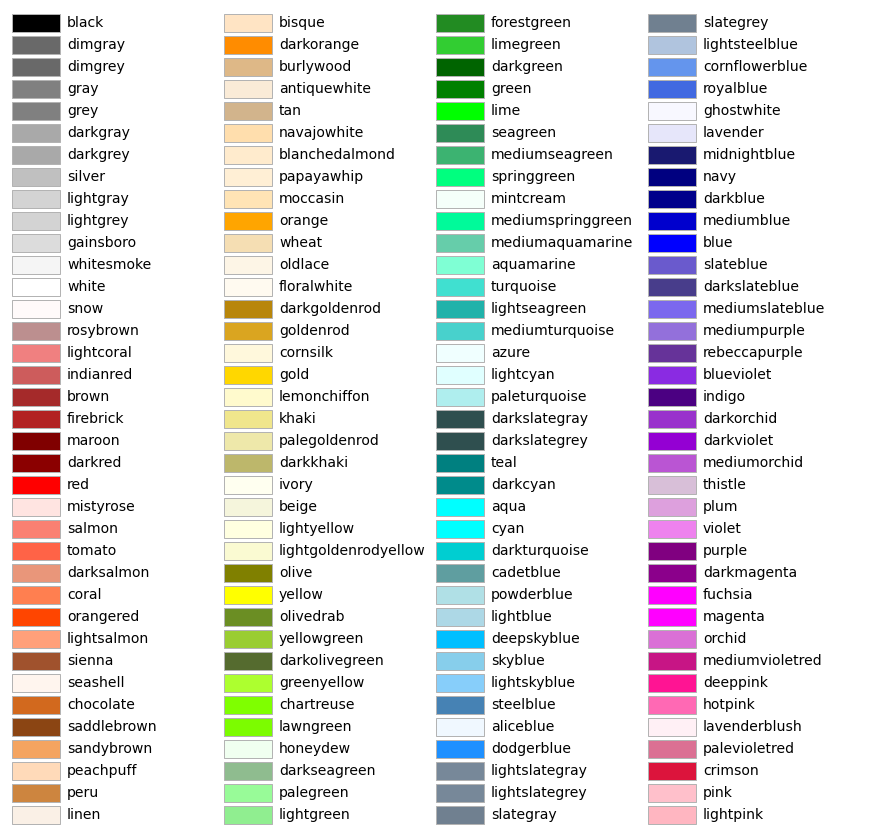
A list of color names can be found at matplotlib’s documentation.
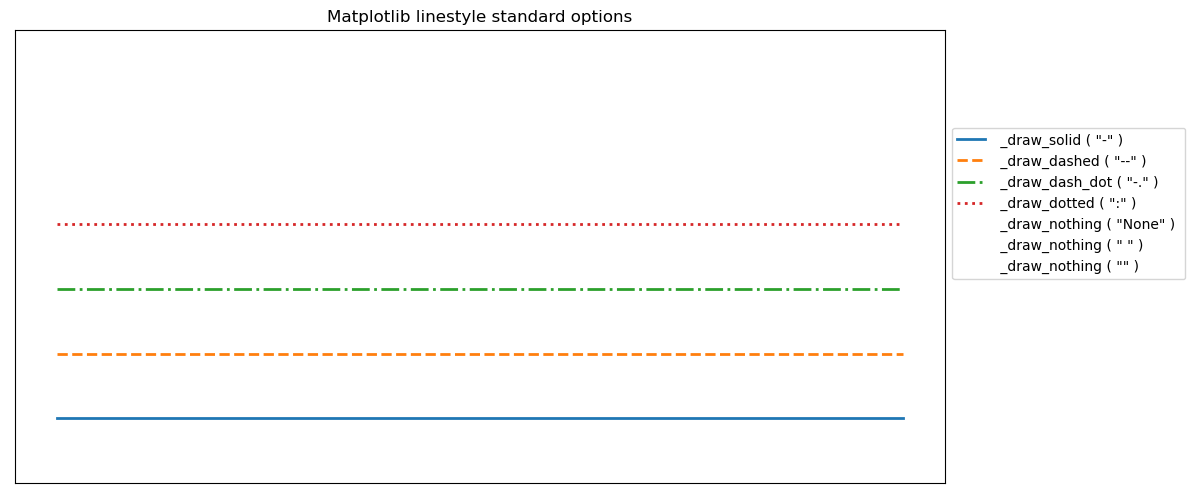
A list of linestyles can be found here.
References
- 1
SCIPY. scipy.stats.gaussian_kde. Available at: www.scipy.org. Access on: 10 May. 2022.
Examples
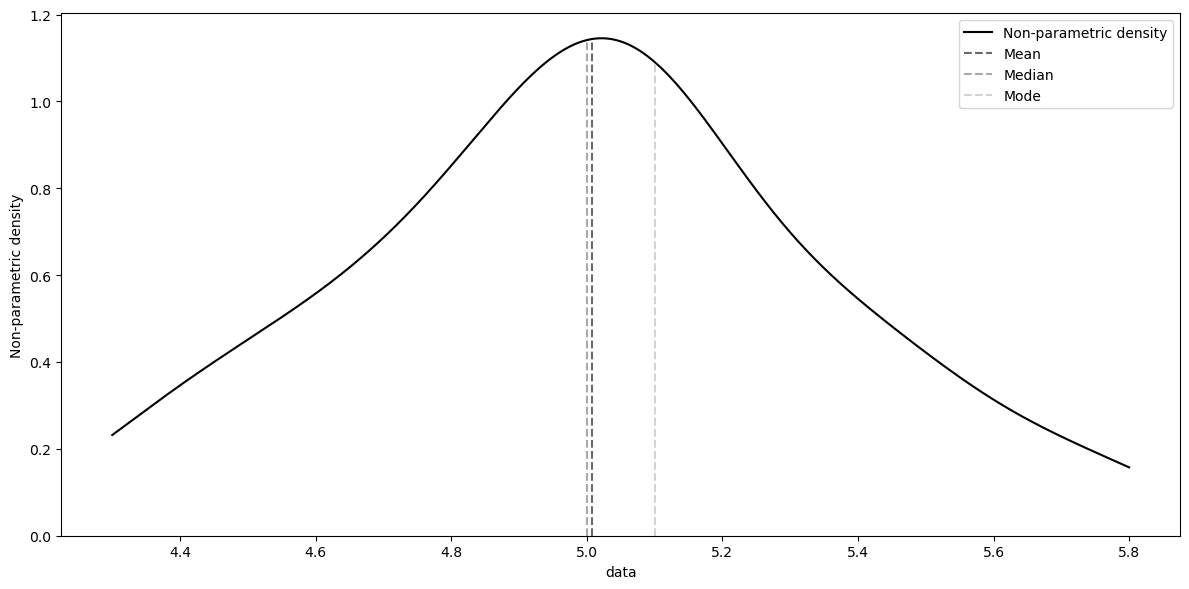
Nonparametric density plot with default parameters plus the measures of central tendency.
>>> from pycafee.normalitycheck.densityplot import DensityPlot
>>> import numpy as np
>>> x_exp = np.array([
            5.1, 4.9, 4.7, 4.6, 5.0, 5.4, 4.6, 5.0, 4.4, 4.9, 5.4, 4.8, 4.8, 4.3, 5.8, 5.7, 5.4, 5.1, 5.7,
            5.1, 5.4, 5.1,4.6, 5.1, 4.8, 5.0, 5.0, 5.1, 5.2, 5.2, 4.7, 4.8, 5.4, 5.2, 5.5, 4.9, 5.0, 5.5, 4.9, 4.4,
            5.1, 5.0, 4.5, 4.4, 5.0, 5.1,4.8, 5.1, 4.6, 5.3, 5.0
            ])
>>> densityplot = DensityPlot()
>>> densityplot.draw(x_exp, which="all", export=True)
    The 'kernal_density.png' file was exported!
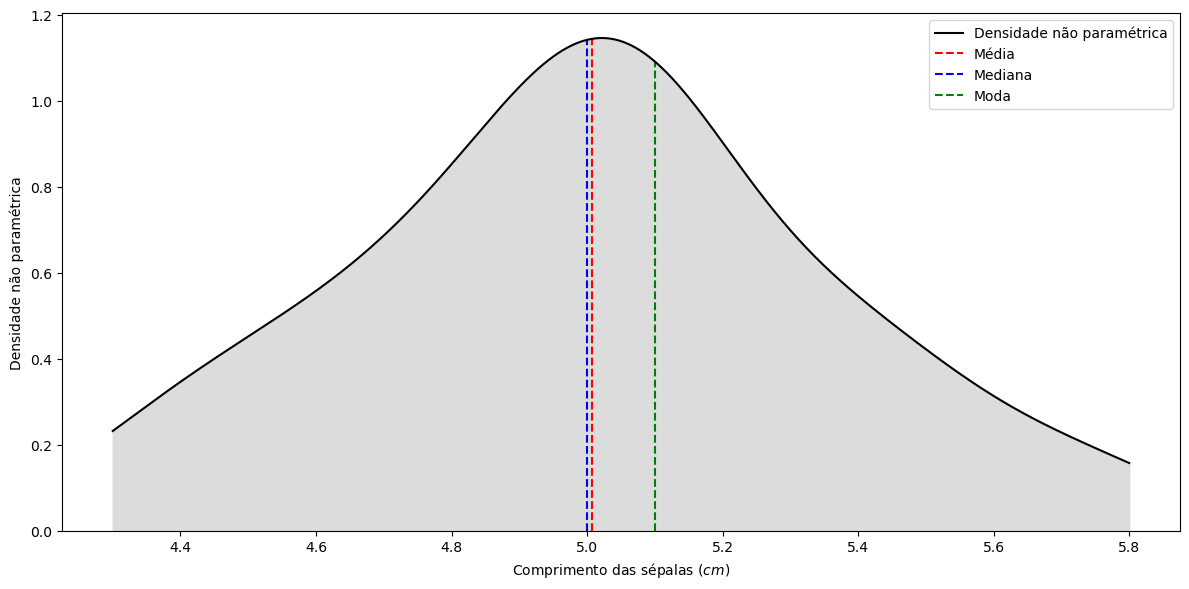
Nonparametric density with some editing
>>> from pycafee.normalitycheck.densityplot import DensityPlot
>>> import numpy as np
>>> x_exp = np.array([
            5.1, 4.9, 4.7, 4.6, 5.0, 5.4, 4.6, 5.0, 4.4, 4.9, 5.4, 4.8, 4.8, 4.3, 5.8, 5.7, 5.4, 5.1, 5.7,
            5.1, 5.4, 5.1,4.6, 5.1, 4.8, 5.0, 5.0, 5.1, 5.2, 5.2, 4.7, 4.8, 5.4, 5.2, 5.5, 4.9, 5.0, 5.5, 4.9, 4.4,
            5.1, 5.0, 4.5, 4.4, 5.0, 5.1,4.8, 5.1, 4.6, 5.3, 5.0
            ])
>>> densityplot = DensityPlot(language="pt-br")
>>> densityplot.draw(x_exp, which="all", export=True, file_name="my_data", plot_design="colored", x_label="Comprimento das sépalas ($cm$)")
    O arquivo 'my_data.png' foi exportado!
- get_language()#
Returns the current language
- set_language(language)#
Changes the current language
- Parameters
- language
str The language code
- language
Notes
The
languagemust be astrwith no more then5elements.